
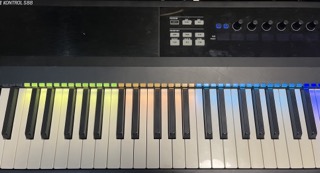
A bunch of songs, all with different split zones on the keyboard. Trying to memorize what was where quickly turned into a game of “oops, wrong octave”, way too often.
But I do have a Komplete Kontrol keyboard — with the Light Guide strip, a separate multicolor LED for each key. Why not use that to display the split points? No more need to remember where, only what. NI actually did this in Komplete Kontrol for their own instruments, but in their commercial wisdom they dropped support for the MK1 generation (and MK2 is probably next), so the software is basically unavailable on current macOS versions. An NKS‑compliant instrument with full Light Guide support loaded in Komplete Kontrol will provide a suitable light map for its own layout. You can also create custom maps, even with different MIDI channels for the zones — but those cannot be changed via MIDI commands.
So: DIY we go.
Problem definition
Build a small piece of software that updates the Light Guide color map whenever a patch changes — in my case, inside VST Live.
VST Live does have a module system and, with some luck, the zone definitions might be exposed directly, but the API isn’t public, so that route is… speculative at best.
Another angle
VST Live already sends program changes for each synth layer when switching songs/parts. If I add a dummy layer whose only job is to emit a program change, I can listen for that, look up the correct Light Guide map, and update the keyboard. That actually seems workable.
Step one: controlling the Light Guide
There are no official specs freely available, but some enthusiasts had already done the detective work. After a few tests, yes — I can connect to the Komplete Kontrol HID device from Python and set the Light Guide colors.
Step two: receiving patch changes
macOS can create virtual MIDI ports out of the box. Add the dummy layer in VST Live, send a program change to that port, and have Python listen for incoming MIDI. Since MIDI only gives 128 program numbers, I also use bank select (MSB + LSB). MSB alone gives 128 × 128 = 16,384 possible songs/parts, which should last me a while, so I’m ignoring LSB for the time being.
Step three: mapping
Each bank/program combination triggers a Light Guide update based on a YAML file. The file defines the zones and their colors for each combination — and the song titles as well, shown in the app screen just to confirm we’re where we’re supposed to be.
Result
It works with any plugin host capable of sending program changes to a virtual port. The tradeoff compared to a hypothetical solution inside VST Live is that it’s a separate app to launch, and I need to define the dummy patch changes and maintain the YAML file — but that’s manageable.
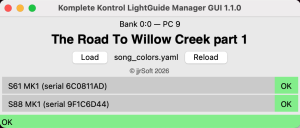
Just in case this would be useful to someone else too, the source code has been uploaded to jjrSoft/KompleteKontrolLightGuideSongConfigs, with a detailed README explaining everything.